
The Best Transcription Alternative in Adobe Premiere Pro

If you edit video in 2026, AI transcription is no longer a luxury—it is a baseline requirement. Whether you are generating subtitles for social media, pulling selects from a multi-hour podcast, or trying to create a paper edit, you need accurate, fast speech-to-text.
But if you have been relying exclusively on Adobe Premiere Pro's native transcription tools, or juggling external web apps to get the job done, you know the workflow is far from perfect.
Here is a look at the biggest issues with current transcription workflows in Premiere Pro, and why Echoe Scribe is emerging as the ultimate alternative for professional video editors looking for speed and accuracy.
The Problem with Premiere Pro’s Native Transcription
Adobe deserves credit for bringing transcription natively into Premiere Pro. However, a quick search through editing forums and Reddit threads reveals a consistent theme: the accuracy just isn't there yet for many professional use cases.
Poor Accuracy on Accents and Jargon The native engine frequently struggles with heavy accents, overlapping dialogue, or industry-specific terminology. This forces editors to spend hours manually listening and correcting text line by line.
Limited Language Support Premiere currently supports roughly 16 to 18 languages. If you work with international clients or creators targeting global audiences, you will often find your required language is completely missing from the application.
Rigid Formatting Constraints Trying to create modern, fast-paced captions—like the 1-word-per-line styles popularized on TikTok and YouTube Shorts—using Premiere's native tools is notoriously difficult. The styling options can feel clunky when you need highly specific, custom subtitle pacing.
The "Round-Trip" Nightmare of External Tools
Because of the limitations of native transcription, many editors turn to third-party web apps like Opus Clip, Descript, or Rev. While these tools often feature better AI engines, they introduce a massive workflow bottleneck known as the "Round-Trip".
The typical process is exhausting. First, you export an audio mixdown of your sequence. Then, you upload that audio to a third-party website and wait for it to process. Once done, you download an .srt file, import it back into Premiere Pro, and drop it on your timeline.
If the client comes back with a revision and you need to cut out 15 seconds of the video, your sync is entirely thrown off. You either have to manually ripple-edit the caption track, or go through the entire tedious export-upload-download round-trip all over again.
Traditional Round-Tripping vs. Echoe Scribe
Here is a visual breakdown of how much time you waste exporting to third-party web apps compared to transcribing directly on your timeline with Echoe Scribe.
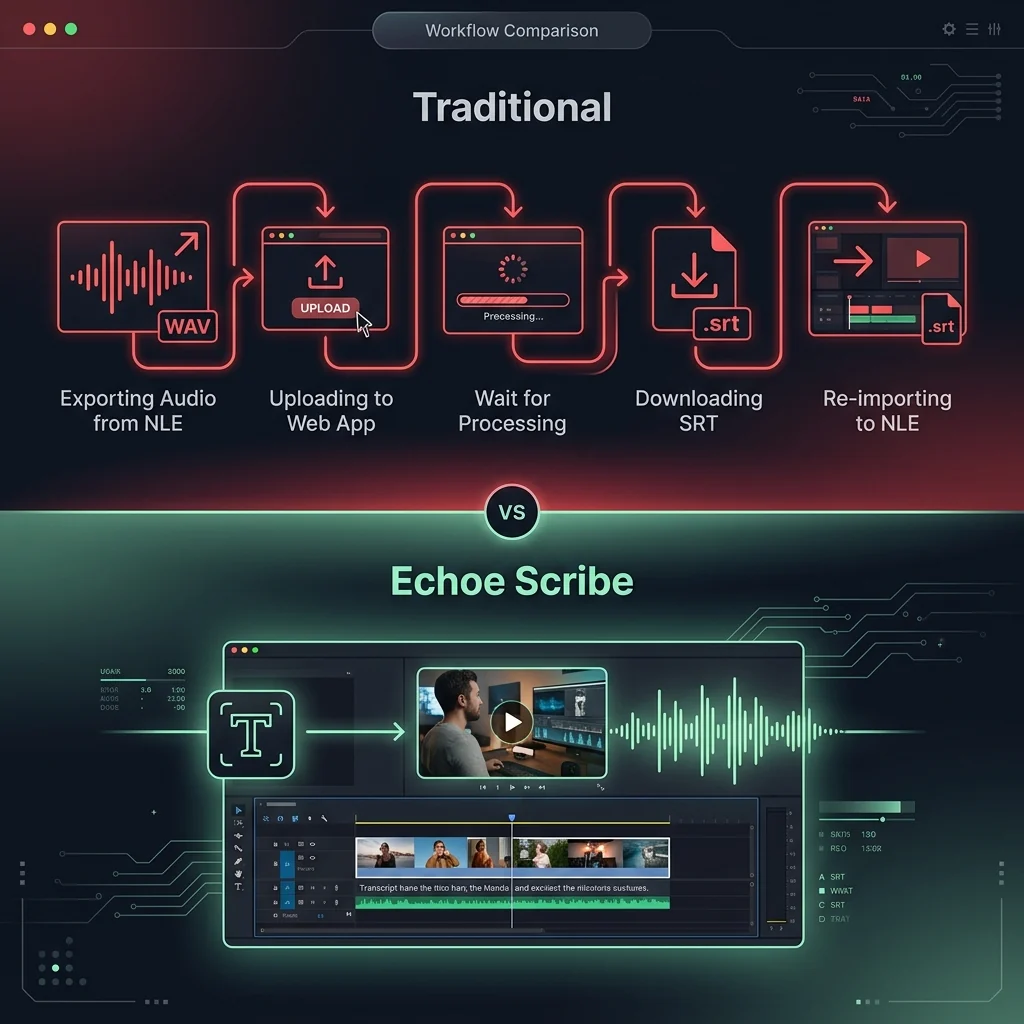
The Solution: Echoe Scribe (Everything, All in Premiere)
We built Echoe Scribe to eliminate these exact friction points. It is a native Premiere Pro plugin that brings enterprise-grade AI transcription directly to your timeline, completely removing the round-trip headache.
If you need to make an editing change, you do not have to leave the app. You simply update your cut and generate your text right there. Here is what makes it the best transcription alternative.
1. Choose Your AI Engine (Because One Size Doesn't Fit All)
Different AI models are trained on different datasets. A model that perfectly transcribes English might struggle with Hindi, or vice-versa.
Echoe Scribe does not lock you into a single model. You can choose between 4 industry-leading AI models: OpenAI Whisper (which runs locally for total privacy and unlimited use), Deepgram for ultra-fast processing, Speechmatics for enterprise-grade accuracy, and AssemblyAI for advanced linguistic handling.
If one model is struggling with a specific speaker's language or accent, simply select a different model from the dropdown. Combined, these models support over 99 languages, completely blowing past Premiere's native limitations.
2. Advanced "Reflow" Captions
One of the most frustrating things in native Premiere is formatting. If you want punchy, 1-word or 2-word captions, you usually have to chop them up manually.
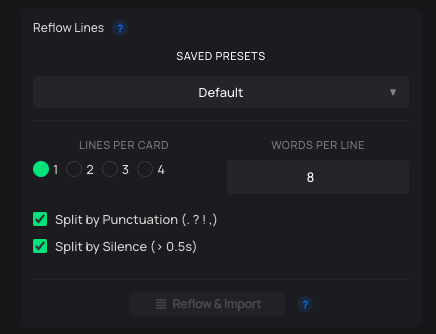
Echoe Scribe includes a powerful Reflow Lines feature. This allows you to automatically restructure your captions by adjusting the exact number of words per line and lines per caption. You get the formatting you want instantly, which is a massive time-saver for creating vertical social media content.
3. Flexible Pricing: Standalone or Suite
Every editor’s budget and toolset is different. That is why Echoe Scribe is available in two ways. You can get it as a Standalone Plugin, which is a one-time purchase with no subscription required. It is perfect for editors who just need a transcription powerhouse. Alternatively, it comes bundled inside our complete Phantom Editor suite, alongside tools like the Wraith Multi-Cam Editor and Silence Remover.
Stop Round-Tripping Your Edits
Transcription should never be the bottleneck in your post-production workflow. By moving past Premiere's native limitations and avoiding the web-app round-trip, Echoe Scribe gives you the accuracy, language support, and formatting control you need, exactly where you need it.
Discover Echoe Scribe and upgrade your transcription workflow today.
