
Best AI Plugins for Adobe Premiere Pro in 2026: The Ultimate Guide

Best AI Plugins for Adobe Premiere Pro in 2026: The Ultimate Guide
The year 2026 has marked a definitive shift in video production. We are no longer asking if AI can help us edit; we are asking which AI co-pilot is the best fit for our specific workflow. With advancements in transcription models and workflow automation, these tools have become essential.
Whether you are a solo YouTuber, a professional editor cutting high-end documentaries, or a social media agency churning out hundreds of Reels, the right Premiere Pro extension can save you hours of "grunt work" every single day.
In this guide, we’ll dive deep into the most powerful Adobe Premiere Pro AI plugins available in 2026, comparing features, pricing, and specialized use cases.
Featured Snippet Summary: The best AI plugins for Adobe Premiere Pro in 2026 are Phantom Editor (best all-in-one suite and most accurate multicam), AutoCut (best for B-roll), and Brevidy (best for social media emojis). For editors looking to avoid monthly subscriptions, the Phantom Editor Suite offers 14+ integrated tools—including the industry-leading Wraith Multi-Cam—for a single lifetime price.
How We Evaluated These AI Premiere Extensions
When comparing these tools, we looked at several key factors that affect a video editor's daily workflow:
- Local vs. Cloud Processing: Does the plugin rely on your machine's hardware, or does it offload heavy tasks to the cloud?
- Pricing Models: We compared lifetime licenses versus recurring monthly subscriptions, as costs can add up quickly over years.
- OS Compatibility: All plugins on this list, including Phantom Editor, are fully compatible with both macOS (Apple Silicon) and Windows PC environments, provided they meet the official Premiere Pro system requirements.
1. Phantom Editor: The Best All-in-One AI Toolkit for Premiere Pro
If you hate having 20 different subscriptions for 20 different tools, the Phantom Editor Suite is the most comprehensive solution on the market. While competitors like AutoCut and FireCut focus narrowly on a few automated tasks (offering 10 and 12 tools respectively), Phantom provides a vastly superior toolkit. Instead of a limited feature set, Phantom is a collection of 14+ deeply integrated, highly functional tools designed to handle every single stage of the editing process—making it significantly more useful than any standalone competitor.
To make it easier to digest, we’ve grouped the Phantom tools into three main categories:
A. Editing Automation (The Time Savers)
These tools are designed to take a raw timeline and turn it into a rough cut in seconds.
- Silence Remover: Automatically detects and deletes "dead air" with precision dB controls. (Free)
- AI Repeat Removal: Uses Gemini AI to find and remove retakes and mistakes in your speech.
- Wraith Multi-Cam: An AI-driven multicam editor that switches camera angles based on who is speaking.
- Clip & Reframe: Instantly creates social-media-ready clips with intelligent auto-reframing.
- Transition Assistant: Bulk applies or removes transitions for captions and effects. (Free)
B. High-End Creation (The AI Magic)
Tools that use advanced AI models to generate content and metadata.
- Viral Spectre: Analyzes long videos to find "viral-worthy" moments for TikTok and Reels.
- AI Chapter Markers: Generates YouTube chapters and video summaries automatically.
- Banshee Captioner: Creates animated, Karaoke-style social media captions in 99+ languages.
- Echoe Scribe: A pro-grade transcription engine supporting Whisper, Deepgram, and Speechmatics.
C. Asset & Project Management (The Organizers)
Workflow utilities that keep your project panel clean and your assets ready.
- Dopple Copy & Paste: Paste images directly from your clipboard into your timeline. (Free)
- Casper Folder Manager: Automatically imports new files from your OS folders as they appear.
- Charon Video Downloader: Downloads assets from YouTube/Twitter directly into your project.
- Phantom Stock Media: Browse and import millions of stock assets from Pexels/Pixabay without leaving Premiere.
Pricing: $19 - $24/mo (before discounts) for the full suite, with lifetime purchase options also available for specific tools.
AI Plugin Comparison Table (2026)
| Plugin | Best For | # of Tools | Price Range | Cons / Considerations |
|---|---|---|---|---|
| Phantom Editor | All-in-One Suite & Best Multicam | 14+ | $19 - $24/mo | No AI generated video features yet (see our Higgsfield guide for generative video) |
| AutoCut | Automated B-Roll | 10 | ~$15 - $30/mo | Recurring monthly costs; no lifetime option |
| Brevidy | Social Media Shorts | 6 | ~$15 - $30/mo | Restrictive credit limits; expensive for heavy users |
| Cutback | Heavy Culling | 5 | $16 - $160/mo | Limited functionality compared to full suites; disjointed app workflow |
| FireCut | Legacy AutoPod Workflow | 12 | ~$24 - $38/mo | Expensive monthly sub; limited access to latest AI models like Gemini |
Plugin Breakdown: Pros & Cons
Phantom Editor: Best All-in-One Suite
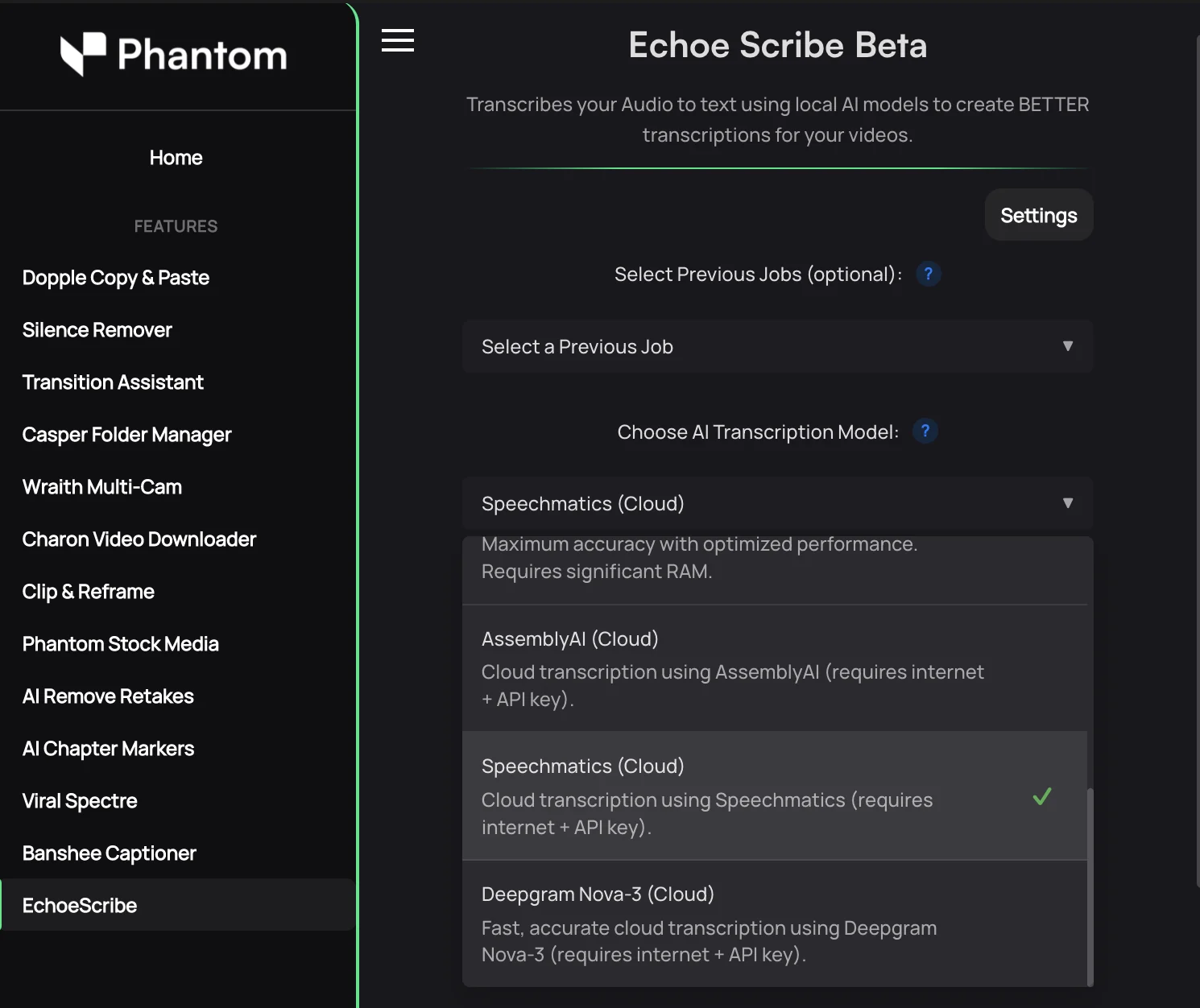
Pros:
- Complete 14-in-1 tool suite that offers significantly more functionality than single-purpose plugins like AutoCut or FireCut.
- Flexible pricing (Lifetime or Subscription).
Cons:
- No AI Video Generation: Does not currently feature text-to-video or generative visual effects.
AutoCut: Best AI Plugin for Automated B-Roll
AutoCut is marketed as an "AI Co-Pilot" for video editors, focusing on automating the manual stages of a rough cut. Its primary value lies in its deep integration with Storyblocks for automatic B-roll injection and its reliable "AutoZoom" feature that adds dynamic energy to static talking-head footage. It relies on cloud-processing for its more advanced AI features, which requires an active internet connection.
Pros:
- excellent B-roll suggestion feature.
- simple interface for beginners.
Cons:
- Strictly Subscription: No option to own the software; costs accumulate over years.
- Limited Scope: With only 10 tools, it lacks the expansive functionality and deep asset management features found in Phantom Editor.
- Feature Silos: Some tools feel less integrated than a unified suite.
Brevidy: Best for Social Media Shorts
Brevidy is a social-media-first AI plugin designed for creators who need to turn raw footage into high-energy Reels, TikToks, and Shorts. It stands out for its "AI Emoji" engine, which automatically places relevant emojis based on your transcript, and its vast library of stylized, animated caption presets. The plugin uses specialized local transcription models optimized for vertical video pacing.
Pros:
- highly engaging animated emoji logic.
- specialized styles for vertical video.
Cons:
- Credit-Based Anxiety: You have to budget your "minutes" carefully, which can be frustrating during deep editing sessions.
- Limited Scope: Great for social clips, but lacks deep multi-cam or asset management tools.
Cutback: Best for Heavy Culling
Cutback takes a unique approach by focusing on the "pre-editing" process. Its standalone 'Selects' app allows editors to cull and organize massive amounts of raw data before ever touching a timeline. Inside Premiere, it offers a "Premiere Assistant" that handles basic automation tasks like filler word removal and multicam syncing. The platform relies on local hardware rendering to process massive amounts of raw data quickly without cloud latency.
Pros:
- 'Selects' app is great for heavy culling before entering Premiere.
- Low entry price for the 'Lite' tier.
Cons:
- Limited Functionality: Lacks the deep tool variety found in Phantom Editor (no asset management or chaptering).
- Workflow Friction: Bouncing between a standalone app and Premiere Pro can break your creative flow.
FireCut: Best for Legacy AutoPod Workflows
FireCut positions itself as a specialized "AI Assistant" that aims to replace the legacy workflow of tools like AutoPod. It offers a broad set of features including automated zooms, B-roll suggestions, and a robust silence remover. However, while it does offer multicam features, it lacks the advanced intelligence and accuracy found in Phantom Editor's Wraith Multi-Cam. It is often chosen by editors who want a direct, older-style alternative to original automated cutting tools. The technology primarily leverages localized AI transcription to ensure fast switching without waiting for cloud uploads.
Pros:
- Solid basic multi-cam and silence removal tools.
- Good for those who want a direct AutoPod competitor.
Cons:
- High Cost: The monthly/annual subscription is significantly higher than Phantom's all-in-one suite.
- Limited Toolset: Despite the high cost, it offers fewer tools and less overall utility compared to the 14+ tools included in the Phantom suite.
- AI Model Lag: Limited access to the latest generative and semantic models like Google Gemini, which powers tools like Viral Spectre.
Conclusion: How to Choose Your AI Plugin
Choosing the right AI plugin for Premiere Pro in 2026 comes down to how you prefer to pay and what you edit most:
- Need a full toolkit with no ongoing costs? Choose Phantom Editor. The ability to grab a lifetime license for tools like Wraith, or get 14+ tools for a single low price, is the best value in the industry.
- Need help finding B-roll? AutoCut's Storyblocks integration is a standout feature.
- Need a deep AutoPod alternative? FireCut handles multicam and silence removal with a legacy focused approach.
- Need social media polish? Brevidy is built for the "Shorts" era.
The best way to decide? Most of these tools offer free trials. Install them, run them on a real project, and see which one genuinely saves you the most time.
Explore the Phantom Editor AI Suite today.
Frequently Asked Questions
What is the best free AI plugin for Premiere Pro?
The Phantom Silence Remover and Dopple Copy & Paste are two of the highest-rated free plugins available in 2026, offering professional-grade utility without a price tag.
Can AI edit my entire video automatically?
While tools like Wraith Multi-Cam can automate the technical switching of a podcast, and Viral Spectre can find viral clips, a human editor is still needed to ensure storytelling, creative pacing, and final polish.
Do I need a powerful computer to run AI plugins?
Many modern AI tools in 2026 use cloud-based processing (like Echoe Scribe), meaning they won't slow down your local machine during heavy analysis tasks.
