
Echoe Scribe v1.3.4 Update: Max Character Length & Whisper Fixes

Echoe Scribe v1.3.4 Update: Max Character Length & Whisper Fixes
We're excited to announce the release of Echoe Scribe v1.3.4! This update brings much-requested features for caption formatting and crucial bug fixes for our local transcription models. For users who also use the Phantom Plugin, these improvements will be making their way into the next suite update very soon.
TL;DR: Echoe Scribe v1.3.4 adds a new "Max Character Length" slider for advanced line wrapping (similar to Premiere Pro's native behavior) and fixes a bug preventing some macOS and Windows users from downloading local Whisper models. Download the update from your dashboard.
What is Echoe Scribe?
For those new to our ecosystem, Echoe Scribe is a powerful AI transcription plugin built directly inside Adobe Premiere Pro. It allows video editors to transcribe sequence audio into over 99 languages using four industry-leading AI speech-to-text models:
- OpenAI Whisper — Local, private transcription with 99+ language support.
- Deepgram Nova-3 — Cloud-based, 48+ languages, blazing fast.
- Speechmatics — Cloud-based, enterprise-grade accuracy.
- AssemblyAI Universe-2 — Cloud-based, advanced features.
Unlike native Premiere Pro transcription, Echoe Scribe gives you the flexibility to choose the best AI engine for your specific project needs, along with advanced caption reflowing capabilities.
What's New in Version 1.3.4?
🆕 New "Max Character Length" Slider
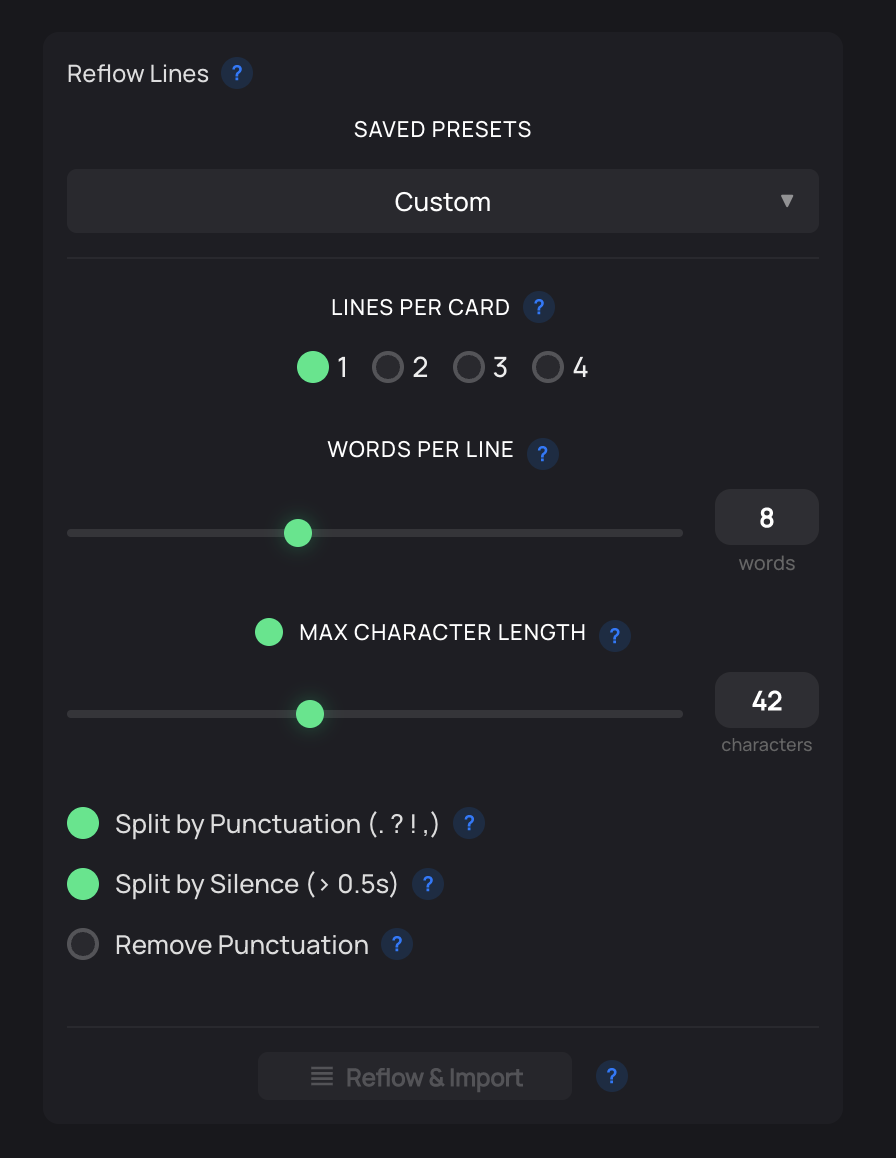
Based on community feedback, we've introduced a Max Character Length setting. If you've used Premiere Pro's native captioning, you'll feel right at home. This feature allows you to strictly control how lines wrap when generating your captions.
- Dynamic Wrapping: Set a maximum character limit, and Echoe Scribe will intelligently break lines to fit your desired width.
- 1-Word Captions: You can easily toggle the 'Max Character length' on or off in the settings. If you're a short-form editor who prefers the 1-word-per-line style (popular on TikTok and Reels), simply adjust your settings accordingly!
🛠️ Whisper Model Download Bug Fixed
We identified and resolved an issue where a handful of macOS and PC users were unable to download the local Whisper Models to their computers. Version 1.3.4 completely fixes this download pipeline, ensuring you can grab the models you need for offline, secure transcription.
Pro Tip: Cloud vs Local Transcription
While local Whisper models are fantastic for offline work and privacy, we highly recommend setting up a free API key with a cloud provider for the best transcription experience.
Cloud transcription providers like Deepgram, AssemblyAI, and Speechmatics offer:
- Faster Speeds: Often transcribing hours of audio in seconds.
- Superior Word Timing: Crucial for precise captioning and subtitle workflows.
- Generous Free Tiers: You can use them without a credit card!
How to Get the Update
- Existing Users: Log in to your user dashboard and download the v1.3.4 installer.
- New Users: You can purchase Echoe Scribe as a standalone plugin or get it bundled with the full Phantom Editor suite.
